2.4 KiB
The same column in different SQL statements can create different type column-level lineage. Those lineages should be picked up separately.
CREATE VIEW dbo.hiredate_view(FirstName,LastName)
AS
SELECT p.FirstName, p.LastName
from Person.Person AS p
GO

update dbo.hiredate_view h
set  h.FirstName =  p.FirstName
from h join Person.Person p
on h.id = p.id;

insert into  dbo.hiredate_view (FirstName,LastName)
SELECT p.FirstName, p.LastName
from Person.Person AS p ;
column to column relations
As you can see, the column: FirstName involves in the three SQL statements: create view, update and insert statement.
While the column LastName involves in the two SQL statement: create view, insert statement.

In the complete lineage mode, if we turn off the show intermediate recordset option, you may find that although it gives you a higher level overview of the table to table relation, but some SQL statement related information such as how one column impact another column are missing.

If we check lineage in the table-level via table lineage tab, you may find diagram like this:
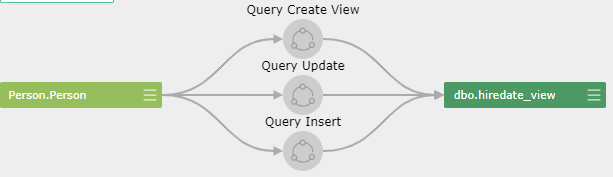
You can see that the statements that involved in the data transformation is persisted, but of course, since it's a table-level lineage, the columns involved in the lineage are hidden. So, it's your choice to use what's kind level of the lineage based on your requirements.
duplicated SQL query
CREATE VIEW dbo.hiredate_view(FirstName,LastName)
AS
SELECT p.FirstName, p.LastName
from Person.Person AS p
GO

update dbo.hiredate_view h
set  h.FirstName =  p.FirstName
from h join Person.Person p
on h.id = p.id;

insert into  dbo.hiredate_view (FirstName,LastName)
SELECT p.FirstName, p.LastName
from Person.Person AS p ;

update dbo.hiredate_view h
set  h.FirstName =  p.FirstName
from h join Person.Person p
on h.id = p.id;
If the update statement is executed twice in the SQL batch as illustrated above, then you will see the update column-level lineage is showing twice in the diagram. These may not we want to see.
